
An SNMP trap receiver for v1, v2c and v3
Traps are how network equipment reports that something changed: a link went down, a power supply failed, a login was refused. MobiObs receives SNMP v1, v2c and v3 traps and informs on a mobile device, a tablet or a laptop, decodes the varbinds and shows every trap it receives, including the ones that fail authentication.
MobiObs is not released yet. It is coming to Google Play first, then the App Store and desktop. Join the launch list to get one email when it is available.
What is supported
| Version | Default | Behaviour |
|---|---|---|
| SNMPv1 traps | udp/1162 | Generic traps are translated to their v2 notification OIDs as described in RFC 3584 |
| SNMPv2c traps and informs | udp/1162 | Informs are acknowledged with a response, so the sender stops retrying |
| SNMPv3 traps and informs | udp/1162 | USM with noAuthNoPriv, authNoPriv and authPriv; MD5, SHA-1 and SHA-2 authentication; DES and AES-128/192/256 privacy (Pro) |
The receiver listens on 1162 rather than 162 because mobile apps cannot bind ports below 1024. Most platforms let you set the trap destination port; the examples below show where.
A trap that fails the community check, or a v3 trap from an unknown user or with a bad digest, is not silently dropped. It is stored and shown with a flag. During troubleshooting that is often the answer in itself: the equipment is sending, but with the wrong community string or credentials.
SNMPv3 and engine IDs
SNMPv3 is the part of trap reception that most often goes wrong, and the reason is usually the engine ID.
- Traps are sent with the sending agent's authoritative engine ID. Authentication and privacy keys are localised to that engine ID, so the receiver must know the user name, the passwords and the protocols, and derive the keys for that agent's engine ID.
- Informs are acknowledged, so the receiver is authoritative. The sender first discovers the receiver's engine ID and then localises its keys to it.
- If you see v3 traps flagged as failing authentication, check in this order: the user name, the security level, the authentication and privacy protocols (SHA-1 and SHA-256 are different protocols), and the passwords.
Add SNMPv3 users in MobiObs Settings. SNMPv3 users are a Pro feature; the Free tier receives v1 and v2c traps. On Cisco IOS, show snmp engineID shows the local engine ID, and on Junos it is shown by show snmp v3.
Configure the sender
Replace 10.20.4.9 with the address on the MobiObs Network screen.
Cisco IOS XE 16.x/17.x, SNMPv2c
snmp-server enable traps snmp linkdown linkup
snmp-server host 10.20.4.9 version 2c public udp-port 1162
Cisco IOS XE 16.x/17.x, SNMPv3 authPriv
snmp-server group MOBIOBS v3 priv
snmp-server user mobiobs MOBIOBS v3 auth sha AuthPass-2026 priv aes 128 PrivPass-2026
snmp-server host 10.20.4.9 version 3 priv mobiobs udp-port 1162
Juniper Junos, SNMPv2c trap group
set snmp trap-group public version v2
set snmp trap-group public destination-port 1162
set snmp trap-group public categories link
set snmp trap-group public targets 10.20.4.9
On Junos the trap-group name is sent as the community string, so the group above sends with community public.
net-snmp 5.8 or later: test traps from Linux or macOS
# v2c linkDown
snmptrap -v 2c -c public 10.20.4.9:1162 '' 1.3.6.1.6.3.1.1.5.3

# v3 authPriv with an explicit engine ID
snmptrap -v 3 -e 0x80001f8880c71100000a1b2c3d \
  -u mobiobs -l authPriv -a SHA -A 'AuthPass-2026' -x AES -X 'PrivPass-2026' \
  10.20.4.9:1162 '' 1.3.6.1.6.3.1.1.5.3
The empty '' argument tells snmptrap to use the current uptime. Send the v2c test first: if it arrives and the v3 one does not, the network path is fine and the problem is in the v3 credentials. More platforms are covered in the vendor guides.
Reading the traps
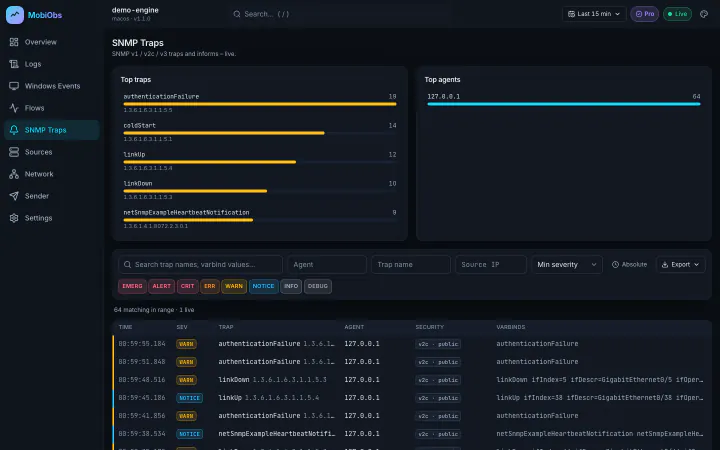
The SNMP Traps screen ranks the most frequent traps and the agents sending them, and lists every trap with its version, security level and decoded varbinds. A burst of linkDown and linkUp from one agent points to a flapping port; repeated authenticationFailure points to a monitoring system, or someone, polling with the wrong community. Because syslog from the same device lands on the same timeline, you can line up a trap with the log messages around it.
Limits to know about
- MIBs. Well-known notifications such as
linkDownare shown by name. Vendor-specific OIDs may appear in numeric form, so keep the vendor MIB to hand. - iPhone and iPad. iOS suspends background apps and a suspended app cannot receive UDP. Keep MobiObs in the foreground.
- Retention. The Free tier keeps one hour of data. Pro makes retention configurable and adds export.