
Syslog RFC 5424
udp/tcp 5514 · tls 6514Structured data with escaping and BOM handling. TCP framing is auto-detected: octet counting (RFC 6587) or LF, CRLF and NUL delimiters.
MobiObs turns a mobile device, whether Android, iOS, a tablet or a laptop, into a portable observability stack. It receives Syslog (RFC 3164/5424, CEF, LEEF), Windows Events via NXLog, NetFlow v5/v9, IPFIX, sFlow v5 and SNMP traps v1/v2c/v3, stores them on the device and shows them live on the device and in any browser on the network.
Coming soon to Google Play and the App Store. Android first, then iOS, tablets and desktop.

The device serves a full web UI over HTTP or HTTPS, so a laptop, a NOC screen or a colleague's tablet can follow the capture while the mobile device stays with the equipment. These screenshots are from a MobiObs engine receiving test traffic.
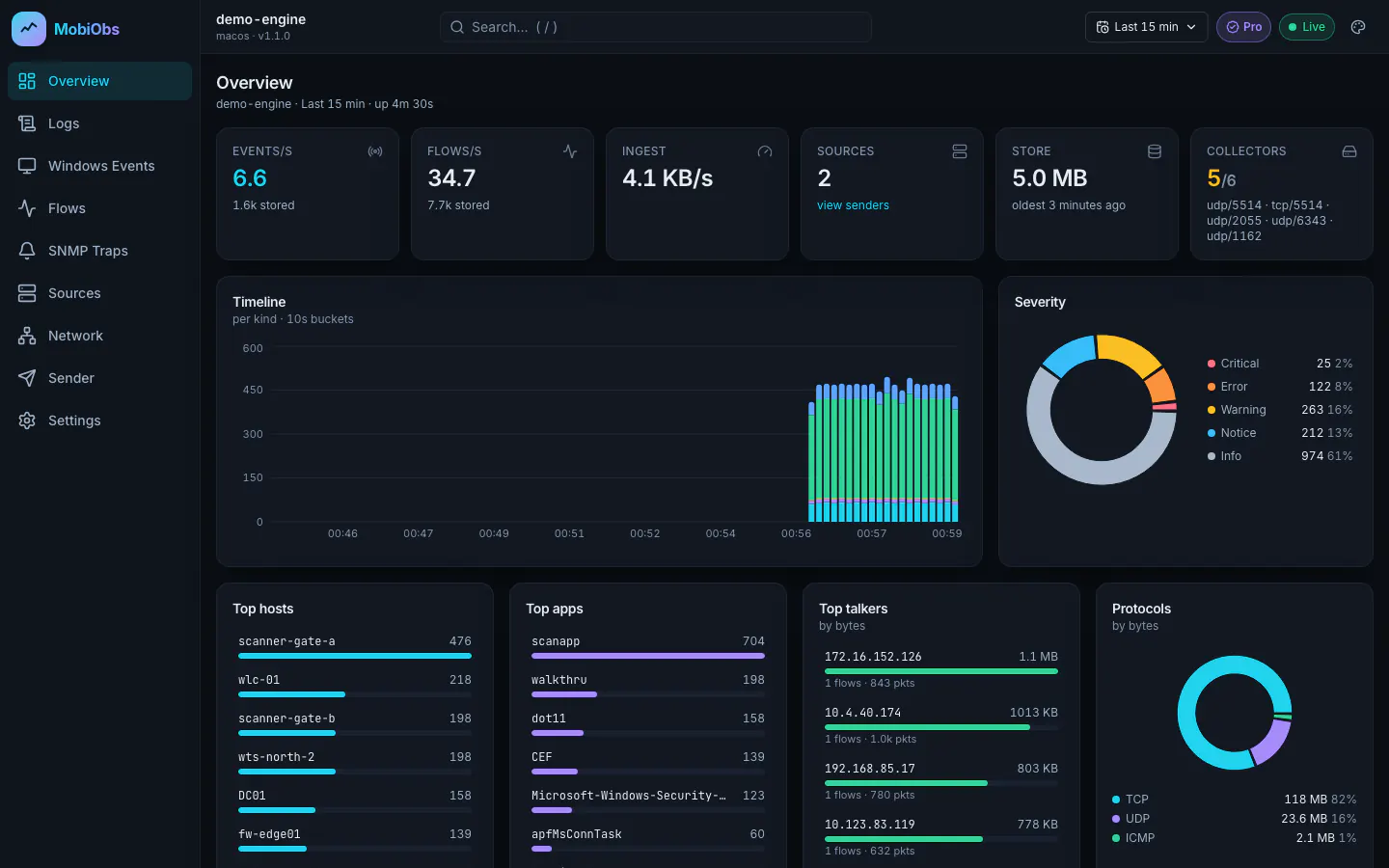
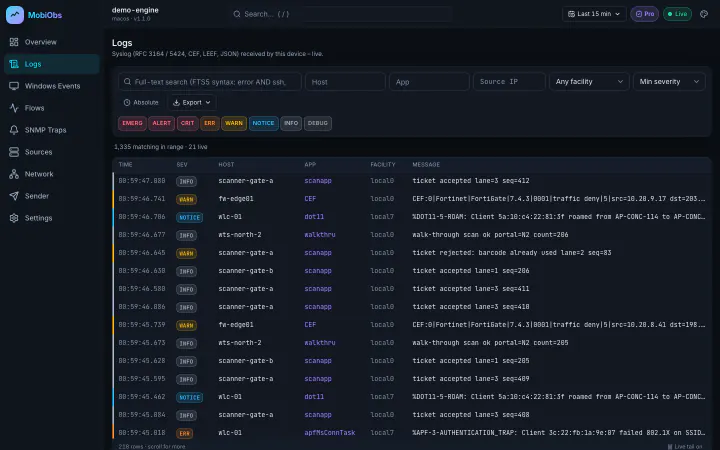
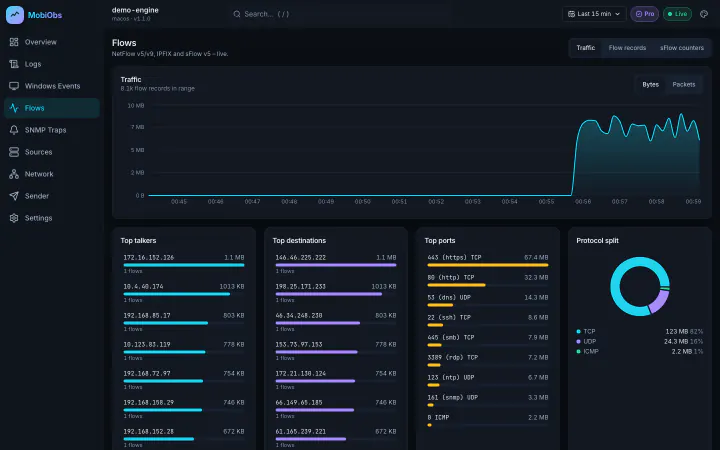
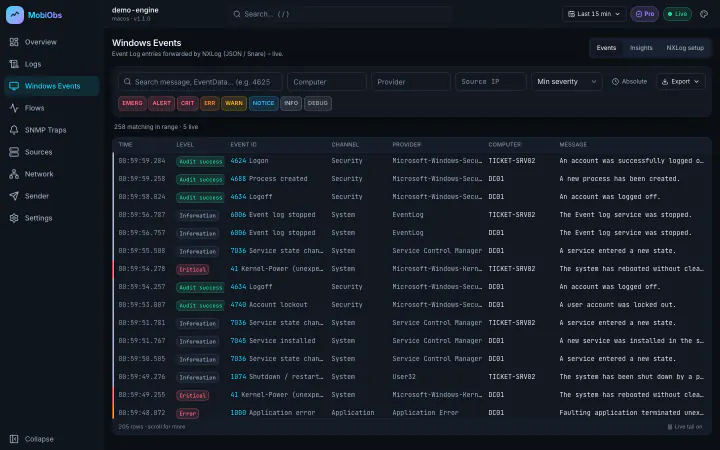
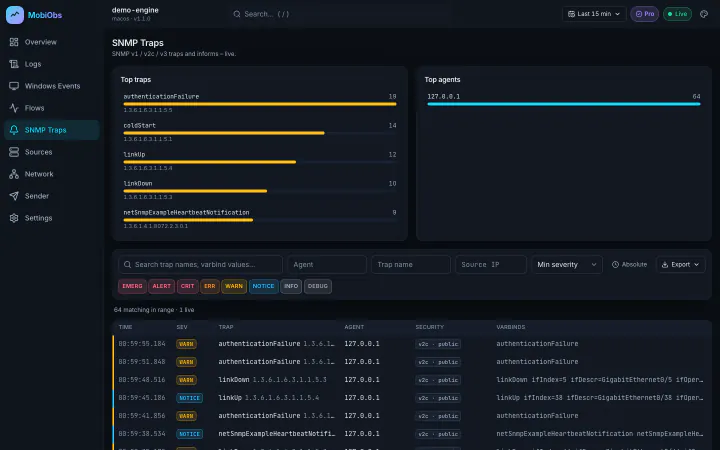
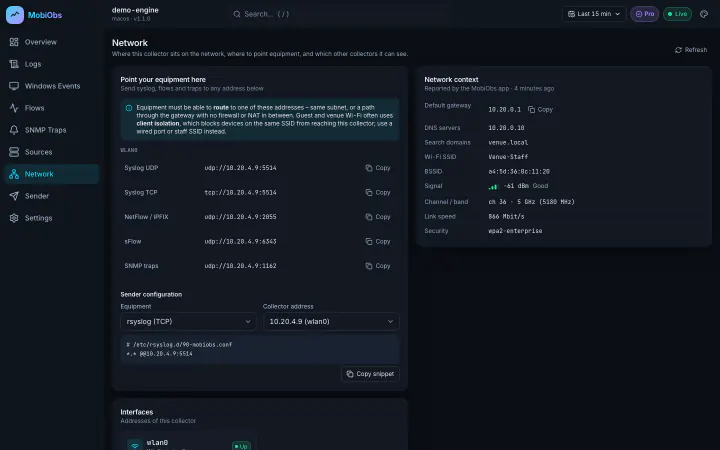
There is no cloud account, agent rollout or collector VM. The device you carry is the collector.
Install MobiObs and open it. The collectors start listening on the device's network interfaces. On Android they run as a foreground service, so collection continues with the screen off.
Send logs, flows and traps to the device's IP address. The Network screen lists each address and port.
# defaults, all configurable
udp/5514  syslog (also tcp/5514)
udp/2055  NetFlow v5/v9 · IPFIX
udp/6343  sFlow v5
udp/1162 SNMP traps · informsFollow the dashboards on the device, or open http://<device-ip>:8080 on any machine that can reach it. Scan the QR code shown in the app to pair a browser with its access token, or use HTTPS on port 8443.
Each collector decodes the wire format into structured fields you can filter on. Unknown fields are kept rather than discarded.
Structured data with escaping and BOM handling. TCP framing is auto-detected: octet counting (RFC 6587) or LF, CRLF and NUL delimiters.
Cisco, Juniper and rsyslog variants, including sequence numbers and mnemonics. The year is inferred, with a rollover guard.
Vendor, product, signature and extension fields are extracted, and CEF/LEEF severity is mapped onto the syslog scale.
NXLog xm_json output with EventID, channel, provider, computer, level and the full EventData map. Snare and plain text are also recognised.
v5 honours the sampling interval. v9 handles templates and multi-record packets, with a template cache per exporter and source ID.
Variable-length and enterprise information elements. Unmapped elements are kept as attributes, and IPv6 endpoints are supported.
Flow samples with raw headers (Ethernet, 802.1Q, IPv4/IPv6, TCP/UDP/ICMP) and counter samples. Bytes are scaled by the sampling rate.
v1 generic traps are translated per RFC 3584, and v2c informs are acknowledged. Traps that fail the community filter are shown, not silently dropped.
USM noAuthNoPriv, authNoPriv and authPriv with MD5, SHA-1 and SHA-2 authentication and DES or AES-128/192/256 privacy. Unauthenticated traps are flagged.
A mobile app cannot bind ports below 1024, so point exporters at the ports above instead of 514 or 162. Every port can be changed in Settings.
MobiObs does not replace your SIEM or NMS. It is for the hours when you are on site, the problem is happening now, and the permanent tooling is out of reach, not pointed at the right devices, or not there at all.
Arenas, stadiums and convention centres, where the network carries ticket scanners, walk-through scanners, point of sale and a wireless controller with thousands of clients.
Change windows and cutovers where you want an independent view of what the equipment is reporting.
Small sites with a router, a firewall, a few access points and no local collector.
Engineers who visit customer networks and need to bring their own tooling.
Events stream live over WebSocket. Stored data is indexed with SQLite FTS5, so you can search message text and filter by severity, host, app, source IP or time range.
Overview, Logs, Windows Events, Flows, SNMP Traps, Sources and Network work out of the box, with no queries to write and no panels to build.
Generate syslog, NXLog-style Windows events, NetFlow v5/v9, IPFIX, sFlow and SNMP traps towards another MobiObs device or any collector, with presets and rate control. A probe checks reachability first.
Other MobiObs devices on the LAN are found by broadcast and mDNS. You can also add peers manually or pair them by scanning a QR code.
The web UI is served over HTTP and HTTPS using a self-signed certificate whose fingerprint the app displays. Access requires a token, which the app shows as text and as a QR code.
Everything MobiObs receives is stored on the device. Nothing leaves it unless you export data or send it to another collector.
The Network screen lists every address and port to point equipment at, with a ready-to-paste sender snippet, and shows the gateway, DNS and Wi-Fi details (SSID, signal, channel) of the network the device is on.
MobiObs needs no cloud account or internet connection. Licence keys are verified offline, and a store subscription keeps working offline beyond its renewal date for a grace period.
The Free tier includes every collector. MobiObs never drops data from a source because of your tier, and reaching a limit never interrupts a running capture. Pricing will be announced at launch.
| Capability | FreeFor quick checks | ProFor individual engineers | TeamFor organisations |
|---|---|---|---|
| Price | Free | Announced at launch | Announced at launch |
| All collectors (Syslog, Windows, NetFlow, IPFIX, sFlow, SNMP v1/v2c), live view, dashboards and web UI | Included | Included | Included |
| Retention | 1 hour | Unlimited (configurable) | Unlimited (configurable) |
| Stored rows (events, flows and counters, each) | 50,000 | Configurable | Configurable |
| SNMPv3 users (authentication and privacy) | Not included | Included | Included |
| Sender / test traffic generator | 1 job at a time, up to 100 messages per job | Unlimited | Unlimited |
| Replay stored data | Not included | Included | Included |
| Export (JSON, NDJSON, CSV) | Not included | Included | Included |
| Peer discovery and QR pairing | Included | Included | Included |
| Custom TLS certificate | Not included | Included | Included |
| Seats | 1 device | 1 user, up to 3 devices | Per seat, with your organisation name on the licence |
Pro and Team will be available as in-app purchases through Google Play and the App Store, and as licence keys for desktop and organisations. For Team enquiries, email sales@mobiobs.com.
MobiObs is coming to Google Play first, then the App Store and desktop. Leave your address and we will tell you when you can install it.
Android and iOS do not let apps bind ports below 1024, so the defaults are udp/5514 for syslog (also tcp/5514), udp/2055 for NetFlow and IPFIX, udp/6343 for sFlow and udp/1162 for SNMP traps. All of them can be changed in Settings.
Most network operating systems let you set the destination port, and the Support page shows the lines for common platforms. If a device can only send to 514 or 162, forward the traffic through a relay or a destination NAT rule on a router.
On Android, MobiObs runs its collectors in a foreground service with a persistent notification, so collection continues with the screen off. You can also exempt it from battery optimisation for long captures.
iOS and iPadOS suspend apps that are not in the foreground, and a suspended app cannot receive UDP traffic. On an iPhone or iPad, keep MobiObs in the foreground during a capture, for example by setting Auto-Lock to Never while you work.
No. Everything MobiObs receives is stored on the device that received it. Data leaves only when you explicitly export it or send it to another collector with Sender or Replay. The app contains no analytics or tracking. See the privacy policy for details.
Install NXLog Community Edition on the Windows host. Configure it with xm_json and xm_syslog, and point an om_udp or om_tcp output at the device on port 5514. MobiObs recognises the events automatically and shows them under Windows Events, with event ID, channel, provider and all EventData fields. Snare format and plain syslog text also work. The Support page has a complete configuration.
Any IP network where the sending equipment can route to the device, whether on the same subnet or through a gateway, provided no firewall or NAT blocks the path. MobiObs works with networks of any size; the limit is reachability, not device count.
The common problem is client isolation on guest and venue Wi-Fi. Isolation stops devices on the same SSID from reaching one another, so equipment cannot reach the mobile device even though both are connected. Use a staff or management SSID without isolation, a wired connection through a USB-C Ethernet adapter where the device supports one, or a VLAN that is routed to the equipment. The Network screen shows which addresses and interfaces the device is using.
No. There is no account, and collection, dashboards and the web UI run entirely on the local network. Licence keys are verified offline. A store subscription is re-checked whenever the device is online, and it keeps working for 14 days past its renewal date while the device is offline.
The guides show the exact lines to send syslog, flows and traps from Cisco, Juniper, Aruba, Fortinet, MikroTik and Linux to a MobiObs device.