
A portable syslog server on a mobile device
When you are on site and need to see what a switch, firewall or controller is logging right now, you rarely have a syslog server that you can point it at. MobiObs turns the mobile device in your pocket, an Android tablet or a laptop into one, with search and live dashboards and nothing to install on the network.
MobiObs is not released yet. It is coming to Google Play first, then the App Store and desktop. Join the launch list to get one email when it is available.
Why a portable syslog server
The permanent logging stack is built for the steady state. During a site visit it tends to be in the wrong place: the SIEM is behind a change process, the collector VM is in another data centre, or the equipment you are looking at was never configured to log anywhere. Common alternatives each have a cost. A laptop running a syslog daemon needs configuration and a firewall exception, and tcpdump gives you packets, not searchable messages.
A collector that you carry lets you add one logging destination to the device you are working on, watch the messages arrive, and remove the destination when you leave. The production configuration never has to change.
What it receives
| Input | Default | Notes |
|---|---|---|
| Syslog over UDP | udp/5514 | RFC 3164 (BSD) and RFC 5424, including structured data |
| Syslog over TCP | tcp/5514 | Framing auto-detected: RFC 6587 octet counting, or LF, CRLF or NUL delimited |
| Syslog over TLS | tcp/6514 | Off by default; enable it in Settings |
| CEF and LEEF | inside syslog | Vendor, product, signature and extension fields are extracted |
| Windows events | inside syslog | NXLog JSON, Snare and text; see Windows Event forwarding |
Cisco, Juniper and rsyslog variants of RFC 3164 are handled, including sequence numbers and %FACILITY-SEVERITY-MNEMONIC tags, and the missing year in BSD timestamps is inferred with a guard for the new-year rollover.
Set it up in five minutes
- Connect the device to a network the sender can reach. A management VLAN, a staff SSID without client isolation, or a USB-C Ethernet adapter all work. Guest Wi-Fi usually does not, because client isolation blocks traffic between devices.
- Open MobiObs. The collectors start on launch. On Android they run as a foreground service, so collection continues with the screen off.
- Read the address from the Network screen. It lists each collector as a URL, such as
udp://10.20.4.9:5514, together with a ready-to-paste sender snippet. - Add the device as a logging host on the equipment (examples below), then watch Overview or Logs.
Android and iOS do not allow apps to listen on ports below 1024, which is why the default is 5514 rather than 514. Almost every network operating system lets you set the destination port. If one cannot, relay the traffic through a router or a Linux host.
Point senders at it
Replace 10.20.4.9 with the address shown on the Network screen.
Cisco IOS XE
logging host 10.20.4.9 transport udp port 5514
logging trap informational
Juniper Junos
set system syslog host 10.20.4.9 any info
set system syslog host 10.20.4.9 port 5514
Linux (rsyslog), /etc/rsyslog.d/90-mobiobs.conf
*.* action(type="omfwd" target="10.20.4.9" port="5514" protocol="tcp"
           template="RSYSLOG_SyslogProtocol23Format")
To check the path before touching any equipment, send a test message from a Linux host with the util-linux logger: logger -n 10.20.4.9 -P 5514 -d "test from $(hostname)". The vendor guides cover Cisco, Juniper, Aruba, Fortinet, MikroTik and rsyslog in detail.
Reading the capture
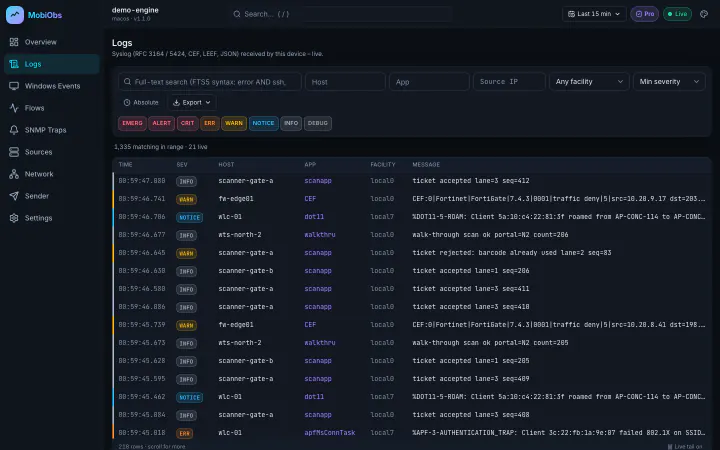
Messages are parsed into timestamp, host, app, facility, severity and message, and stored on the device in SQLite with a full-text index. The Logs screen tails new messages live, and you can search message text or filter to one host or one severity while traffic keeps arriving. Overview shows the rate, the severity split and the top hosts and apps, which is often enough to spot the one device that is suddenly noisy.
The same screens are served over HTTP on port 8080 (or HTTPS on 8443), so a colleague can follow the capture from a laptop while the device stays next to the equipment. Browsers pair with a token that the app shows as text and as a QR code.
Limits to know about
- iPhone and iPad: iOS suspends apps in the background, and a suspended app cannot receive UDP. Keep MobiObs in the foreground during a capture.
- UDP is lossy. Bursts of UDP syslog can be dropped by the network before they reach any collector. Use TCP where the sender supports it.
- Retention: the Free tier keeps one hour and 50,000 rows per table. Pro makes retention configurable and adds export to JSON, NDJSON and CSV. Final prices are announced at launch.
- It is a site tool. MobiObs does not replace a SIEM or long-term log archive. All data stays on the device unless you export it.