
A NetFlow, IPFIX and sFlow collector on a mobile device
Syslog tells you what a device thinks is happening. Flow records tell you where the traffic actually goes. MobiObs receives NetFlow v5 and v9, IPFIX and sFlow v5 on a mobile device, a tablet or a laptop, so you can see top talkers, ports and protocols during a site visit without standing up a flow analyser.
MobiObs is not released yet. It is coming to Google Play first, then the App Store and desktop. Join the launch list to get one email when it is available.
Formats and ports
| Protocol | Default | What is decoded |
|---|---|---|
| NetFlow v5 | udp/2055 | Fixed records; the sampling interval in the header is honoured |
| NetFlow v9 | udp/2055 | Templates and multi-record packets; template cache per exporter and source ID, with a TTL. Options templates are skipped |
| IPFIX (v10) | udp/2055 | Variable-length and enterprise information elements; unmapped elements kept as attributes; IPv6 endpoints |
| sFlow v5 | udp/6343 | Flow samples with raw header decode (Ethernet, 802.1Q, IPv4/IPv6, TCP/UDP/ICMP) and counter samples; bytes scaled by the sampling rate |
NetFlow and IPFIX share one port, because the version field in each packet identifies the format. As with every MobiObs collector, the port is above 1024 because mobile operating systems do not let apps bind lower ports, and you can change it in Settings.
Templates, sampling and timeouts
Three exporter settings decide how quickly useful data appears, so it is worth understanding them before you judge an empty screen.
- Templates. NetFlow v9 and IPFIX data records cannot be decoded until the template that describes them has arrived. Exporters resend templates on a timer, often every few minutes by default, so a collector that starts after the exporter may wait that long before the first flows appear. Lower the template refresh interval while you work, for example
template data timeout 60on Cisco Flexible NetFlow. - Sampling. Sampled exporters send one packet in N. MobiObs multiplies byte and packet counts by the sampling rate reported by NetFlow v5 and sFlow, so totals approximate the real traffic, but short flows can be missed entirely at high rates. For v9 and IPFIX, the sampling rate is usually sent in options records, which MobiObs skips, so treat those counts as sampled if the exporter samples.
- Active and inactive timeouts. A long-lived flow is only exported when its active timeout expires. With a 30-minute default, a large transfer can be invisible for half an hour. An active timeout of 60 seconds and an inactive timeout of 15 seconds keep the dashboards close to real time.
sFlow has no templates or flow cache: each datagram carries sampled packet headers and interface counters, so data appears as soon as the agent sends it.
Configure the exporter
Replace 10.20.4.9 with the address on the MobiObs Network screen.
Cisco IOS XE 16.x/17.x, Flexible NetFlow (v9)
flow record MOBIOBS-REC
 match ipv4 source address
 match ipv4 destination address
 match ipv4 protocol
 match transport source-port
 match transport destination-port
 match interface input
 collect counter bytes long
 collect counter packets long
 collect timestamp absolute first
 collect timestamp absolute last
!
flow exporter MOBIOBS
 destination 10.20.4.9
 source Vlan10
 transport udp 2055
 export-protocol netflow-v9
 template data timeout 60
!
flow monitor MOBIOBS-MON
 exporter MOBIOBS
 record MOBIOBS-REC
 cache timeout active 60
 cache timeout inactive 15
!
interface GigabitEthernet1/0/1
 ip flow monitor MOBIOBS-MON input
Use export-protocol ipfix for IPFIX. A user-defined record is shown because some platforms, including the Catalyst 9000 family, do not accept the predefined record netflow ipv4 original-input.
Juniper Junos (EX series), sFlow
set protocols sflow collector 10.20.4.9 udp-port 6343
set protocols sflow sample-rate ingress 1024
set protocols sflow polling-interval 20
set protocols sflow interfaces ge-0/0/0
Linux: softflowd (NetFlow v9 from an interface)
softflowd -i eth0 -v 9 -n 10.20.4.9:2055 -t maxlife=60Linux: host sFlow agent, /etc/hsflowd.conf
sflow {
  sampling = 400
  polling = 20
  collector { ip = 10.20.4.9 udpport = 6343 }
  pcap { dev = eth0 }
}
More platforms are covered in the vendor guides, including FortiGate NetFlow, MikroTik Traffic Flow and Aruba sFlow.
Reading the flows
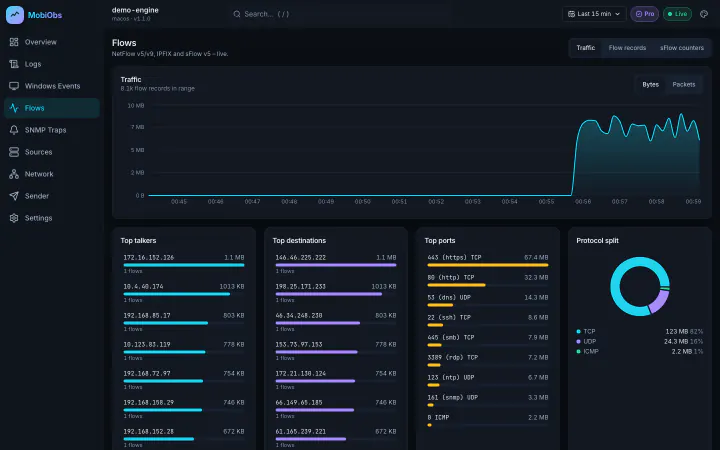
The Flows screen charts bytes over time and ranks top talkers, destinations, ports and protocols for the window you choose. This answers most site-visit questions directly: which client is filling the uplink, whether traffic to a payment or ticketing API is leaving through the expected path, and whether a cutover moved traffic where the plan said it would. Overview puts the flow rate next to the syslog rate, so a burst of errors and a change in traffic can be compared on one timeline.
Flows from several exporters can arrive at once. The Sources screen lists every exporter that has reached the device, with its address, kinds and last-seen time, which is the quickest way to confirm that a new exporter is working.
Limits to know about
- Volume. A mobile device is not sized for a busy border router exporting unsampled flows. Export from the interfaces you are investigating, and sample on high-speed links.
- Retention. The Free tier keeps one hour and 50,000 flow rows. Pro makes retention configurable and adds export. Prices are announced at launch.
- iPhone and iPad. iOS suspends background apps, so keep MobiObs in the foreground while collecting.